

Variables and Integration
Montage parameters
Section titled “Montage parameters”Parameters let one Montage asset receive runtime context. Supported values include:
- boolean;
- number;
- string;
- GameObject;
Vector3; and- color.
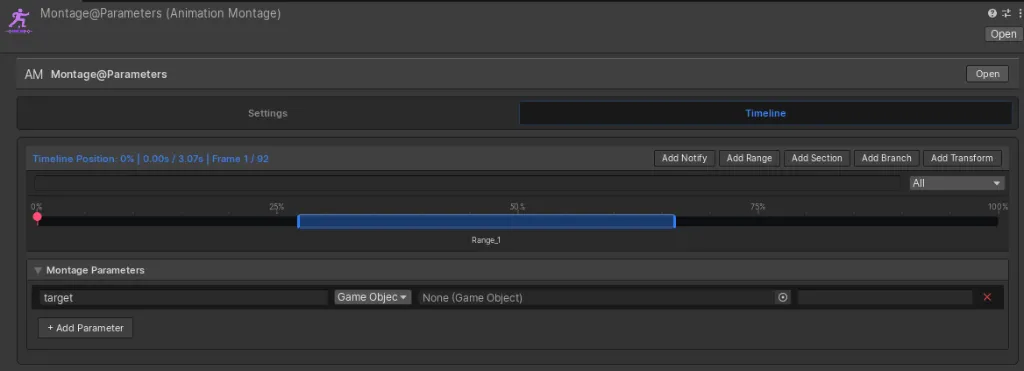
The Play Montage Action can override a parameter by name without modifying the asset:
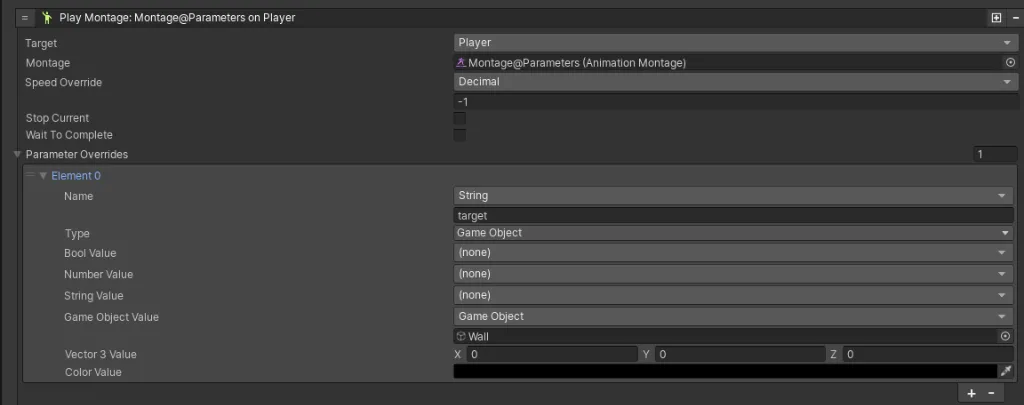
Integration flow
Section titled “Integration flow”- Define a parameter on the Montage asset.
- Reference the parameter from an authored track or instruction.
- Set its runtime value in a Game Creator Action.
- Play the Montage.
- React to its Notifies, Windows, Branches, or completion hooks.
Visual-scripting events
Section titled “Visual-scripting events”Notifies and Windows can run Game Creator 2 Instruction Lists directly. Triggers are available for start, completion, cancellation, notification, and Window open or close events.
Use direct instructions for short, local effects. Prefer a dedicated script or reusable instruction asset for complex behavior.
C# integration
Section titled “C# integration”The C# API exposes these events:
player.OnNotificationFired += HandleNotification;player.OnWindowOpened += HandleWindowOpen;player.OnWindowClosed += HandleWindowClose;Always unsubscribe from matching events when the listener is disabled. See the complete preserved example in C# API.
Assembly integration
Section titled “Assembly integration”Projects using custom assembly definitions may need explicit Game Creator and Input System references. See Installation and Architecture before changing assembly boundaries.