Events
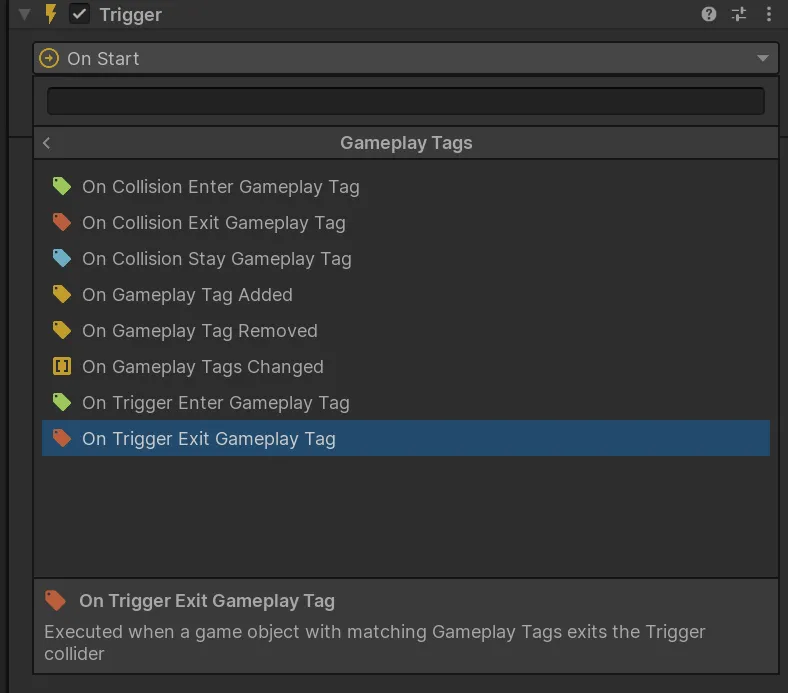
Gameplay Tags Events let a Trigger react when component state changes or when a matching tagged object participates in a Unity physics callback.
Component events
Section titled “Component events”| Event | Runs when |
|---|---|
| On Gameplay Tags Changed | A target component’s tag container changes. |
| On Gameplay Tag Added | A matching tag is added. |
| On Gameplay Tag Removed | A matching tag is removed. |
The documented 1.0.0 integration also includes an event for exclusive-child changes.
Physics events
Section titled “Physics events”| Event | Runs when |
|---|---|
| On Trigger Enter Gameplay Tag | A matching tagged object enters a trigger. |
| On Trigger Exit Gameplay Tag | A matching tagged object exits a trigger. |
| On Collision Enter Gameplay Tag | A matching tagged object begins colliding. |
| On Collision Stay Gameplay Tag | A matching tagged object remains colliding. |
| On Collision Exit Gameplay Tag | A matching tagged object stops colliding. |
Use Unity layers to limit physics candidates, then use the tag filter to express gameplay meaning.
Matching guidance
Section titled “Matching guidance”- Use Exact for one complete path.
- Use Include Children for a parent query that should accept owned descendants.
- Use Any only when any non-empty
GameplayTagComponentis sufficient.
When listening from custom C#, use the component events documented in GameplayTagComponent.