

Reference Entries
Asset References does not require a dedicated MonoBehaviour component. Its central data unit is a reference entry stored in the active repository.
Entry fields
Section titled “Entry fields”| Field | Documented purpose |
|---|---|
ID |
Stable Reference ID used by selectors, variables, C#, and usage scanning. |
Asset |
Project asset or prefab assigned to the entry. |
Enabled |
Controls whether the entry is included in the runtime cache. |
Load Mode |
Chooses Direct or Streamed resolution. |
Display Name |
Optional friendlier label for lists and selectors. |
Category |
Broad grouping such as audio, prefabs, ui, or scenes. |
Tags |
Comma-separated filters; the source also uses them for Streamed labels. |
Notes |
Human-readable maintenance context. |
Type Override |
Optional display override when the inferred Unity type is not the most useful label. |
| Streaming fields | Address, group, labels, preload policy, and release policy when Load Mode is Streamed. |
Direct entries
Section titled “Direct entries”A Direct entry stores a serialized asset reference that the runtime cache resolves synchronously. Direct mode is recommended for simple projects and content that is always needed.
Streamed entries
Section titled “Streamed entries”A Streamed entry stores the metadata needed to register and load the asset through Addressables. Its loading and release lifecycle depends on the selected policies. See Streaming and Addressables.
Advanced details
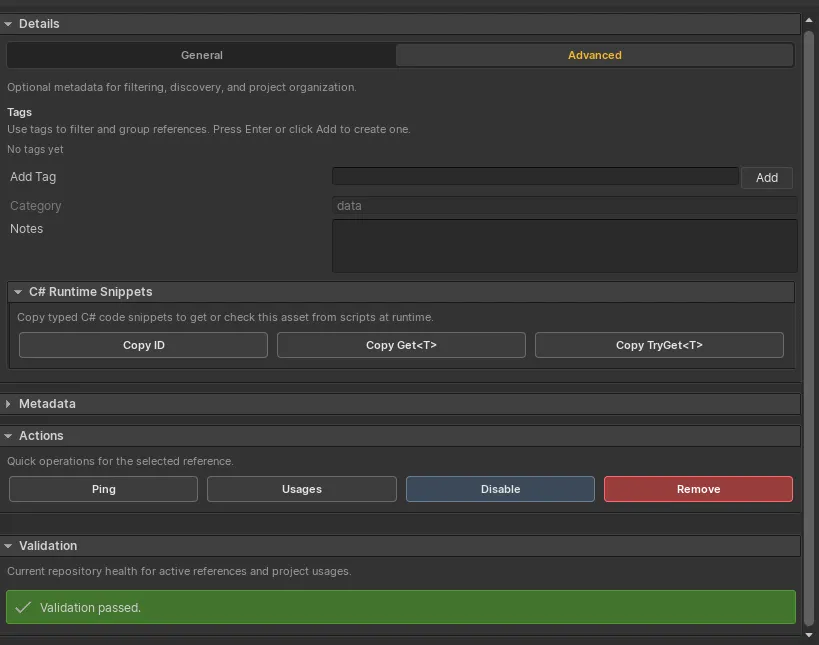
Section titled “Advanced details”The Advanced tab brings together tags, category, notes, copyable runtime snippets, selected-entry actions, and validation status.
Entry actions
Section titled “Entry actions”The editor exposes actions to:
- ping the assigned asset;
- inspect serialized usages;
- enable or disable the entry;
- remove the entry;
- copy its ID; and
- copy typed
Get<T>orTryGet<T>runtime snippets.
Streamed entries also expose synchronization and repair controls.